What it does
Drop ranking
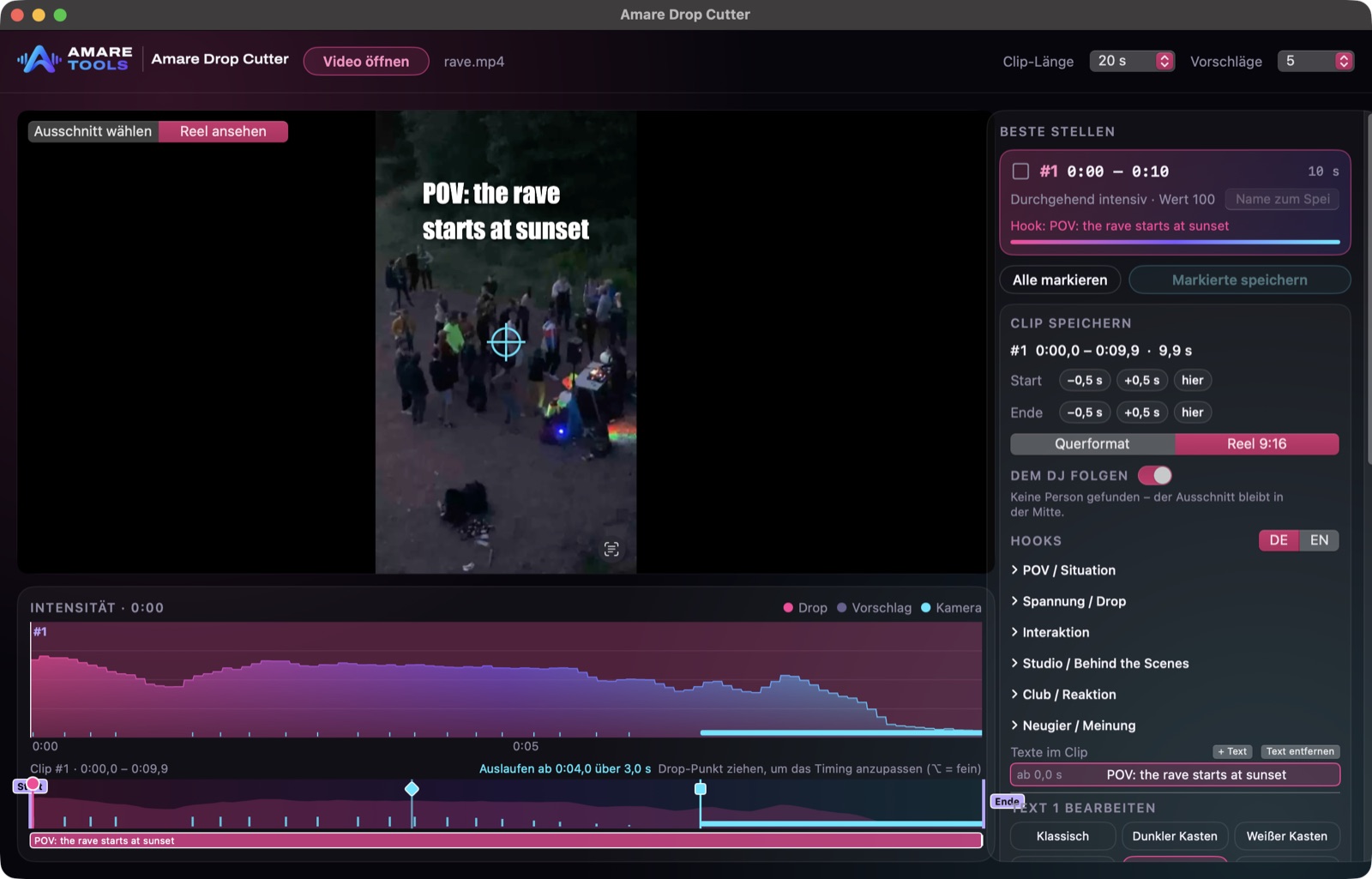
It listens through the whole set, finds every drop and ranks the moments by strength. The best ones come first, each with a short lead-in before the drop.
Follows the DJ
From a wide video it cuts the 9:16 part and keeps the DJ in the middle, even across camera cuts. Tap someone else and it follows them.
Hook picker
Ready hooks by theme (POV, tension, studio, club) in English and German, or your own text, in many fonts and colours. They sit in the area Instagram doesn’t cover.
Art effects
15 effects such as mirror world, neon edges, glitch, tunnel pull and strobe until the drop. Or one tap on “Brutal” for the full colour explosion.
Everything on the beat
It finds the tempo of every clip. Zooms, beat pulses and effects sit on the kick, and the drop is the first big push. A countdown to the drop if you want one.
Many reels in one go
Tick several clips, give each its own name and save them together. Templates keep your favourite look.

This fast
Six steps from the app, recorded on an iPhone. Each clip is a few seconds, sped up where the app thinks. Videos without sound.
-
1Drop in your set
Pick the video from Photos. The app listens through the whole set and finds the drops.
-
2Just nudge it
Lead-in, drop and end sit in the clip lane. Move them with one finger.
-
3Art effects
Mirror world, neon edges, glitch, tunnel and more, on the beat.
-
4Pick a hook
Ready hooks by theme or your own text, in many fonts and colours.
-
5Countdown to the drop
Numbers or a line like “Wait for the drop” count down to the drop.
-
6Zoom by hand, then save
Set zooms while it plays, “Sync” puts them on the beat. The reel goes straight to Photos.
Made with Drop Cutter
How it works, in 21 seconds
Before and after
Drop Cutter
The app for your DJ videos, for iPhone and Mac
Finds the drops in a long set and suggests the best moments.
Saves every highlight as a reel in 1080 × 1920, ready for Instagram.
Puts hooks like “POV: 5 a.m. …” on top and zooms on the beat.
How it works
-
Open
Open a long DJ video from Photos or Files.
-
Pick
Choose from the ranked drops.
-
Shape
Hook, effects, zooms and who to follow.
-
Save
Save the reel in 1080 × 1920, straight to Photos.
Good questions
Does it upload my videos?
No. Everything runs on your iPhone or Mac.
When can I buy it?
Soon in the App Store, for iPhone and Mac. Join the waiting list to hear first.
What does it cost, and when?
Price and date are not set yet. The tools are in development. Join the waiting list to hear both first.